02

02

02

Predictive Scheduling

Predictive Scheduling

Predictive Scheduling

The Predictive Scheduling module enriches existing scheduling tools with demand based forecasts and smart balancing helping nurse leaders easily create accurate optimized schedules.

The Predictive Scheduling module enriches existing scheduling tools with demand based forecasts and smart balancing helping nurse leaders easily create accurate optimized schedules.

The Predictive Scheduling module enriches existing scheduling tools with demand based forecasts and smart balancing helping nurse leaders easily create accurate optimized schedules.

Company

Product

Role
Duration
Platform

Company

Product

Role
Duration
Platform

Aya Healthcare

Predictive Scheduling
Senior Product Designer (IC)
2024 - Present
Enterprise Web (B2B Saas)

Aya Healthcare

Predictive Scheduling
Senior Product Designer (IC)
2024 - Present
Enterprise Web (B2B Saas)

Impact

Impact

Impact

  • Enabled organizations to schedule staff proactively rather than reactively

  • Optimized shift coverage across multiple departments, reducing last-minute shortages

  • Contributed to smoother operational planning as part of Aya’s Workforce AI suite

Problem

Problem

Problem

Healthcare scheduling is complex:

  • Multiple roles, shift types, and locations

  • Manual scheduling leads to last-minute coverage gaps

  • Reactive decision-making increases operational risk and staff burnout


The challenge:
Design a predictive scheduling experience that anticipates staffing needs, surfaces conflicts early, and allows flexible human oversight — without overwhelming the user with data.

Healthcare scheduling is complex:

  • Multiple roles, shift types, and locations

  • Manual scheduling leads to last-minute coverage gaps

  • Reactive decision-making increases operational risk and staff burnout


The challenge:
Design a predictive scheduling experience that anticipates staffing needs, surfaces conflicts early, and allows flexible human oversight — without overwhelming the user with data.

My Role & Scope

My Role & Scope

My Role & Scope

I led the product design for Predictive Scheduling, partnering with:

  • Product Management

  • Engineering

  • Data Science

  • Operational leaders

  • Executive stakeholders


Responsibilities:

  • Defining the end-to-end scheduling experience

  • Translating predictive algorithms into actionable scheduling recommendations

  • Aligning workflows across operational and executive users

  • Rapid prototyping for iterative testing and stakeholder alignment

I led the product design for Predictive Scheduling, partnering with:

  • Product Management

  • Engineering

  • Data Science

  • Operational leaders

  • Executive stakeholders


Responsibilities:

  • Defining the end-to-end scheduling experience

  • Translating predictive algorithms into actionable scheduling recommendations

  • Aligning workflows across operational and executive users

  • Rapid prototyping for iterative testing and stakeholder alignment

Users & Context

Users & Context

Users & Context

Primary users:

  • Staffing coordinators

  • Workforce planners

  • Department heads


Users needed to:

  • Quickly identify conflicts or gaps in staffing

  • Adjust schedules efficiently while considering predictive insights

  • Maintain transparency and fairness for staff


Key constraints:
Errors in scheduling could lead to understaffed shifts or operational disruption, so trust and interpretability were critical.

Primary users:

  • Staffing coordinators

  • Workforce planners

  • Department heads


Users needed to:

  • Quickly identify conflicts or gaps in staffing

  • Adjust schedules efficiently while considering predictive insights

  • Maintain transparency and fairness for staff


Key constraints:
Errors in scheduling could lead to understaffed shifts or operational disruption, so trust and interpretability were critical.

Key Constraints &

Design Challenges

Key Constraints & Design
Challenges

Key Constraints & Design
Challenges

  • Prediction accuracy vs human judgment: Balancing AI recommendations with manager discretion

  • Data complexity: Many roles, shifts, and constraints must be visualized clearly

  • Workflow fit: Schedules needed to integrate with existing staff systems

  • Trust in automation: Users had to feel in control of AI-assisted schedules


These constraints informed every interaction, visualization, and workflow decision.

Design Approach

Design Approach

Design Approach

Predictive Scheduling is a system that moves teams from static schedules to AI-assisted, continuously optimized schedules — while preserving human control.


  • Scenario-based scheduling: Users can simulate changes (shift swaps, staffing adjustments) to see impact

  • Progressive disclosure: Only critical information is surfaced upfront, details available on demand

  • Contextual recommendations: AI predictions come with rationale and confidence indicators

  • Integration: Scheduling recommendations embedded directly into existing workflows to minimize friction


Close collaboration with Data Science ensured recommendations were accurate, actionable, and explainable.

Key Design Decisions

Key Design Decisions

1. Make scheduling recommendations actionable


  • Recommended shifts presented with clear rationale

  • Visual indicators of risk, coverage, and priority

  • Users can accept, modify, or reject suggestions

1. Make scheduling recommendations actionable


  • Recommended shifts presented with clear rationale

  • Visual indicators of risk, coverage, and priority

  • Users can accept, modify, or reject suggestions

2. Scenario simulation and “what-if” analysis


  • Users can adjust staffing assumptions and see predicted outcomes

  • Allows proactive staffing decisions without waiting for crises


2. Scenario simulation and “what-if” analysis


  • Users can adjust staffing assumptions and see predicted outcomes

  • Allows proactive staffing decisions without waiting for crises


3. Highlight conflicts and gaps visually


  • Color-coded alerts for overlapping shifts or undercoverage

  • Visual hierarchy guides user attention to the most urgent issues

4. Progressive disclosure for trust


  • Advanced AI details (model confidence, reasoning) hidden behind expandable panels

  • Avoids overwhelming operational users while keeping transparency for curious managers
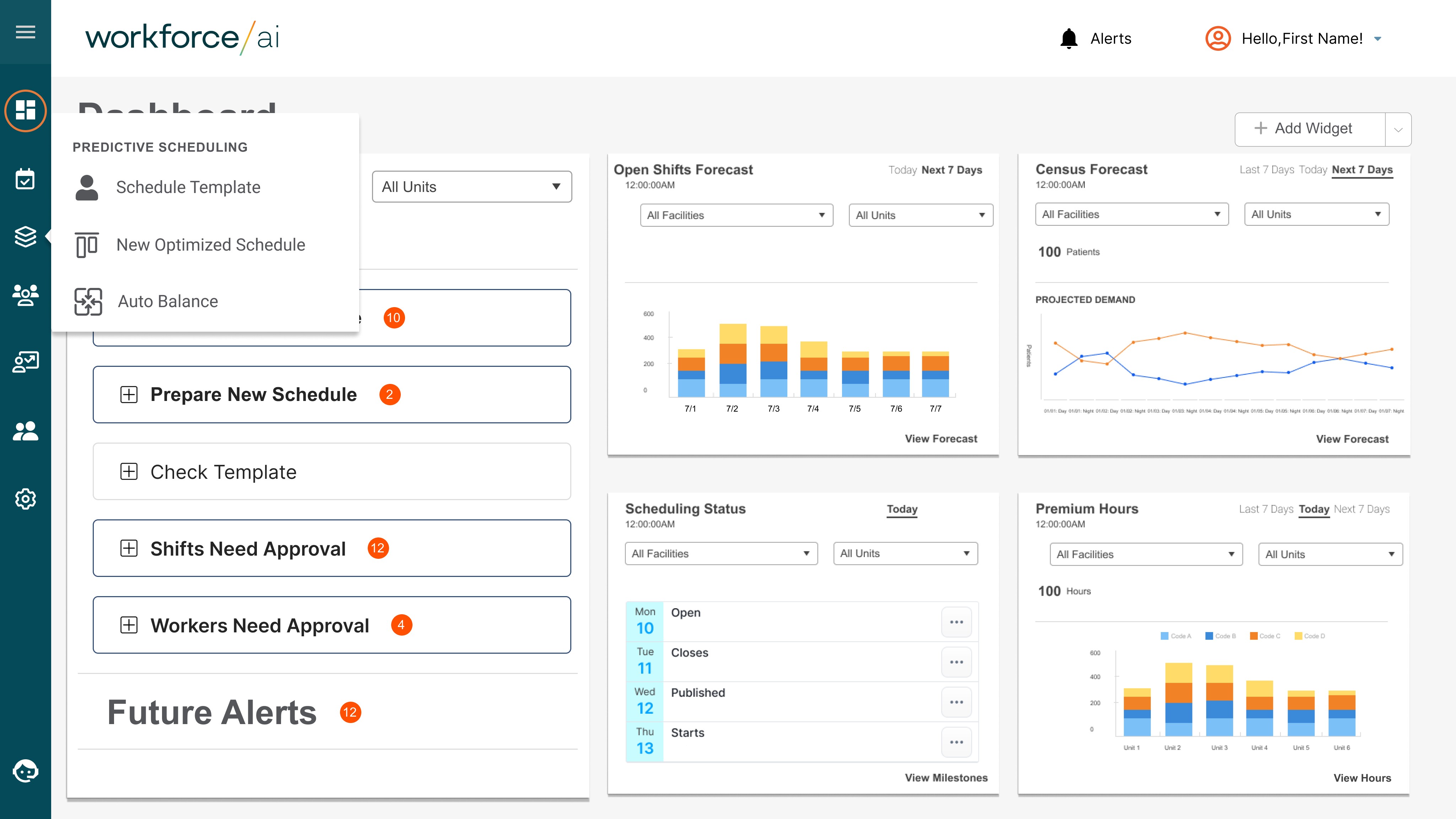
Predictive Scheduling System Overview

Predictive Scheduling

System Overview

A modular scheduling system supporting creation, optimization, and continuous adjustment
Designed Predictive Scheduling as a set of connected modules, each optimized for a different scheduling decision.

These three modules are a progression, not features:

  1. Schedule Template → Define intent and constraints

  2. New Optimized Schedule → Generate an AI-assisted baseline

  3. Auto-Balance → Maintain coverage as conditions change


Frame the three modules as a progression, not features:

  1. Schedule Template → Define intent and constraints

  2. New Optimized Schedule → Generate an AI-assisted baseline

  3. Auto-Balance → Maintain coverage as conditions change


A modular scheduling system supporting creation, optimization, and continuous adjustment
Designed Predictive Scheduling as a set of connected modules, each optimized for a different scheduling decision.

These three modules are a progression, not features:

  1. Schedule Template → Define intent and constraints

  2. New Optimized Schedule → Generate an AI-assisted baseline

  3. Auto-Balance → Maintain coverage as conditions change


Frame the three modules as a progression, not features:

  1. Schedule Template → Define intent and constraints

  2. New Optimized Schedule → Generate an AI-assisted baseline

  3. Auto-Balance → Maintain coverage as conditions change


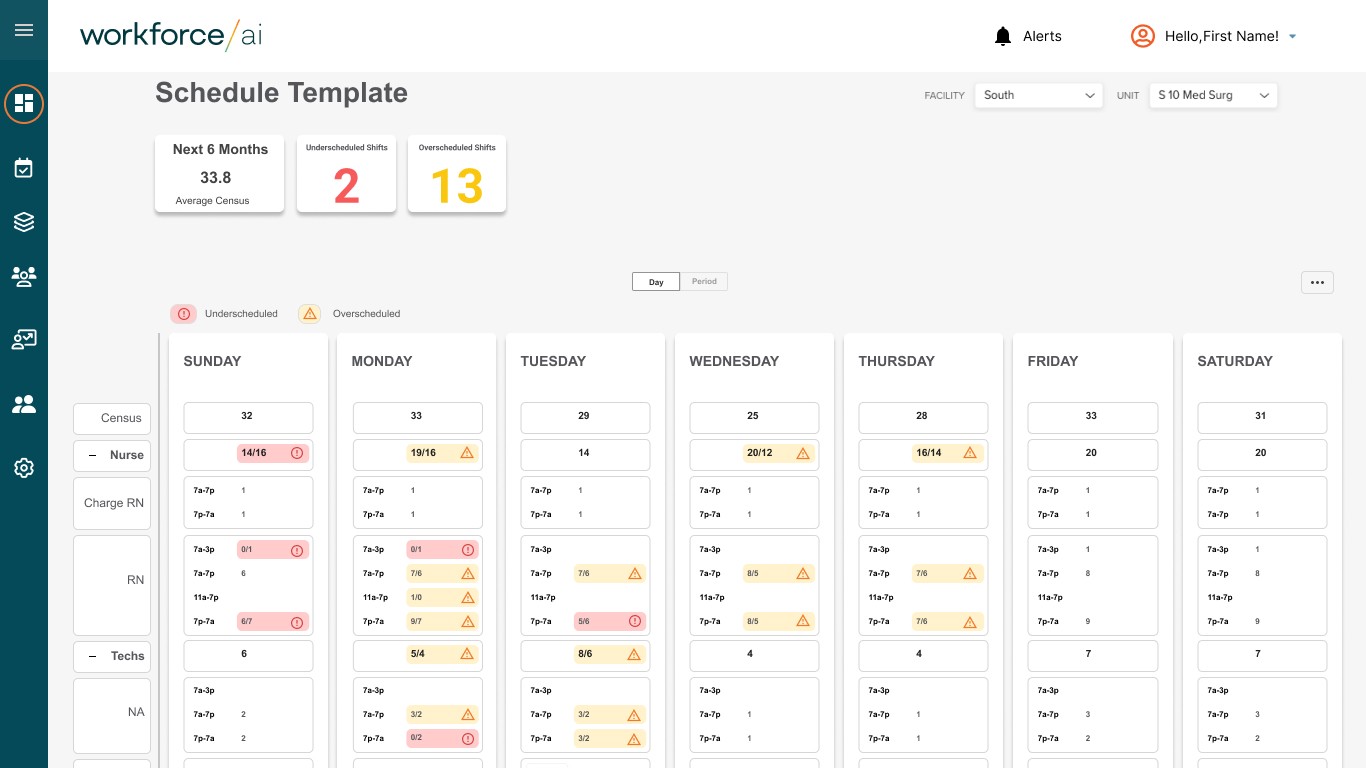
Schedule Template Overview

Schedule Template

Overview

Encoding scheduling intent and constraints upfront
Designed templates to capture real-world staffing needs before introducing optimization.


Frame the three modules as a progression, not features:

  1. Schedule Template → Define intent and constraints

  2. New Optimized Schedule → Generate an AI-assisted baseline

  3. Auto-Balance → Maintain coverage as conditions change


Encoding scheduling intent and constraints upfront
Designed templates to capture real-world staffing needs before introducing optimization.


Frame the three modules as a progression, not features:

  1. Schedule Template → Define intent and constraints

  2. New Optimized Schedule → Generate an AI-assisted baseline

  3. Auto-Balance → Maintain coverage as conditions change


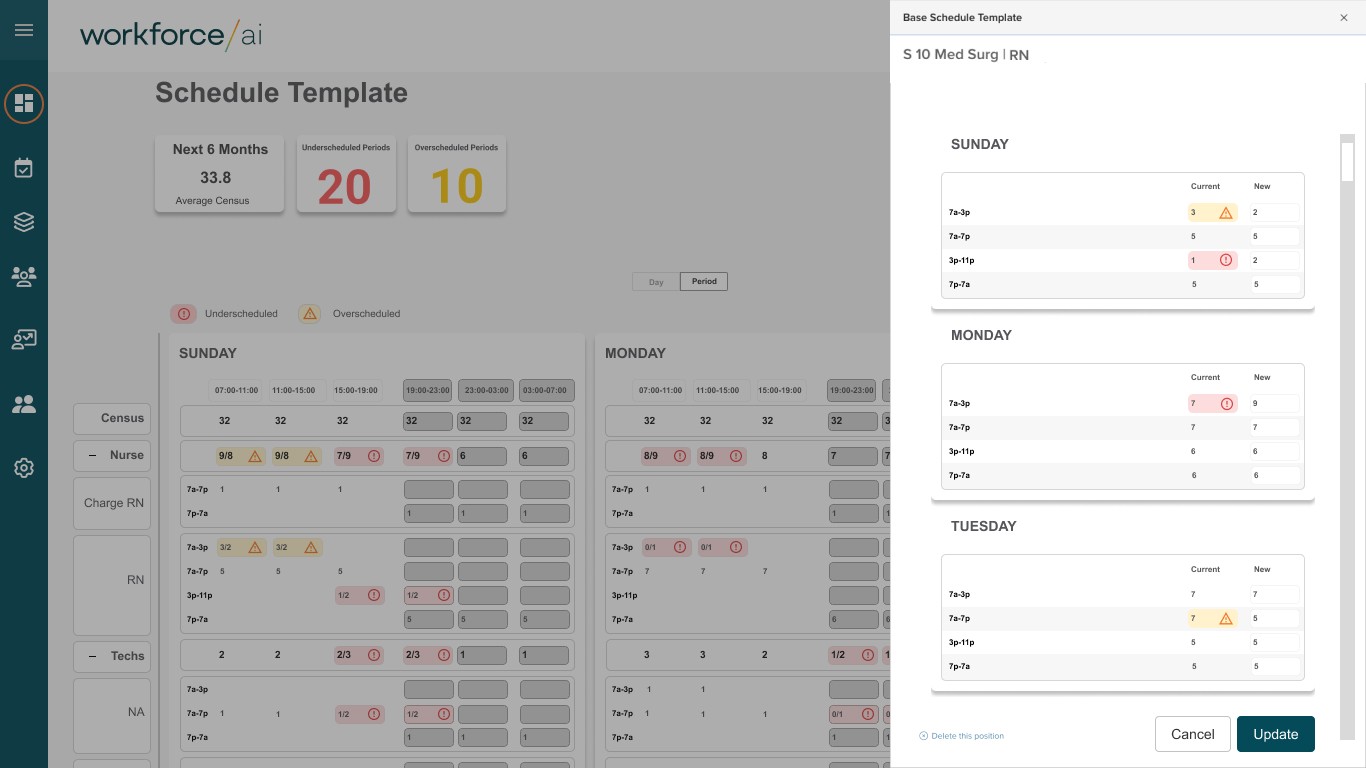
Base Schedule Template Detail

Base Schedule

Template Detail

Constraining optimization to reflect operational reality
Ensured AI outputs respected labor rules, coverage requirements, and team preferences.


Frame the three modules as a progression, not features:

  1. Schedule Template → Define intent and constraints

  2. New Optimized Schedule → Generate an AI-assisted baseline

  3. Auto-Balance → Maintain coverage as conditions change


Constraining optimization to reflect operational reality
Ensured AI outputs respected labor rules, coverage requirements, and team preferences.


Frame the three modules as a progression, not features:

  1. Schedule Template → Define intent and constraints

  2. New Optimized Schedule → Generate an AI-assisted baseline

  3. Auto-Balance → Maintain coverage as conditions change


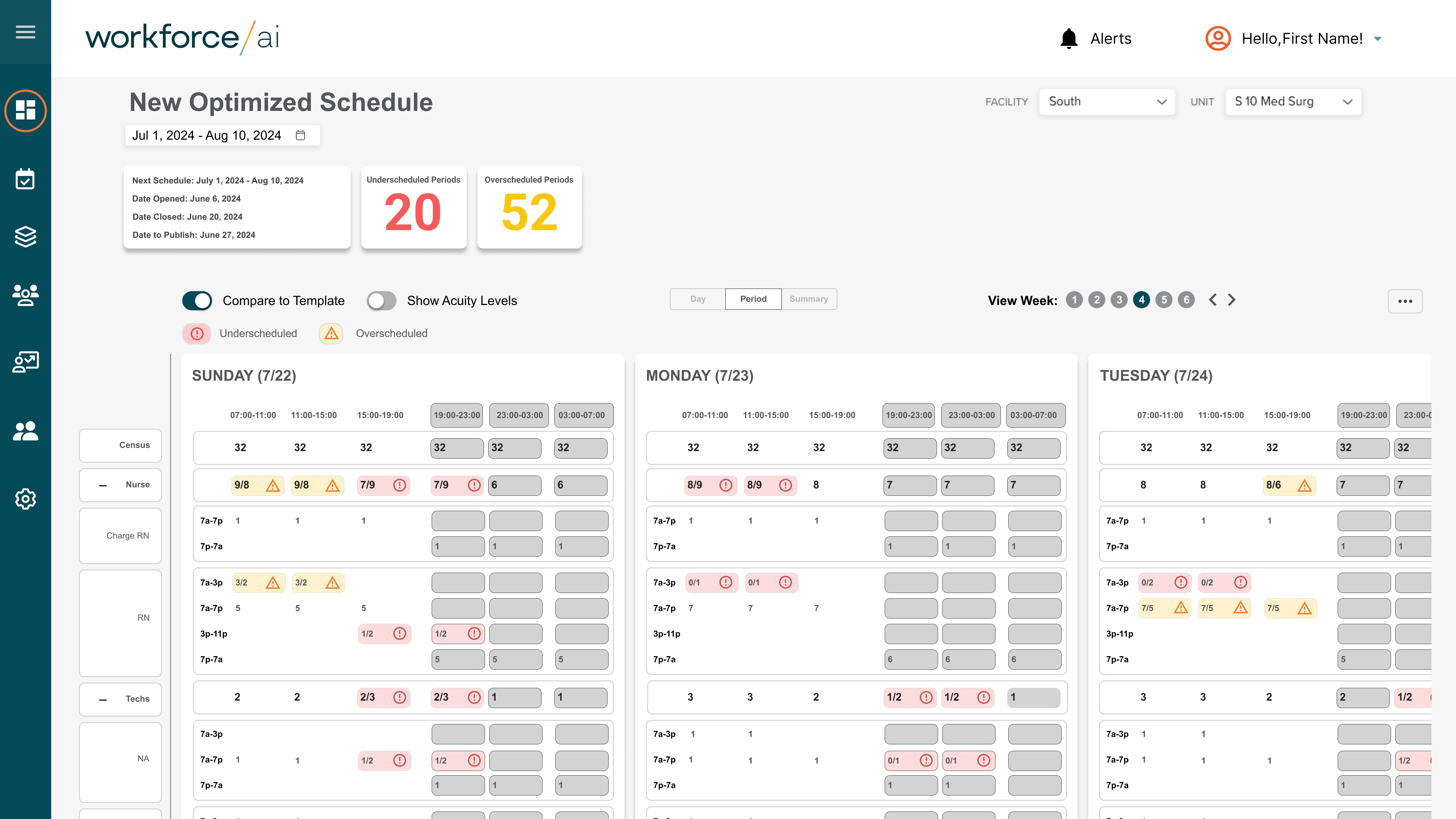
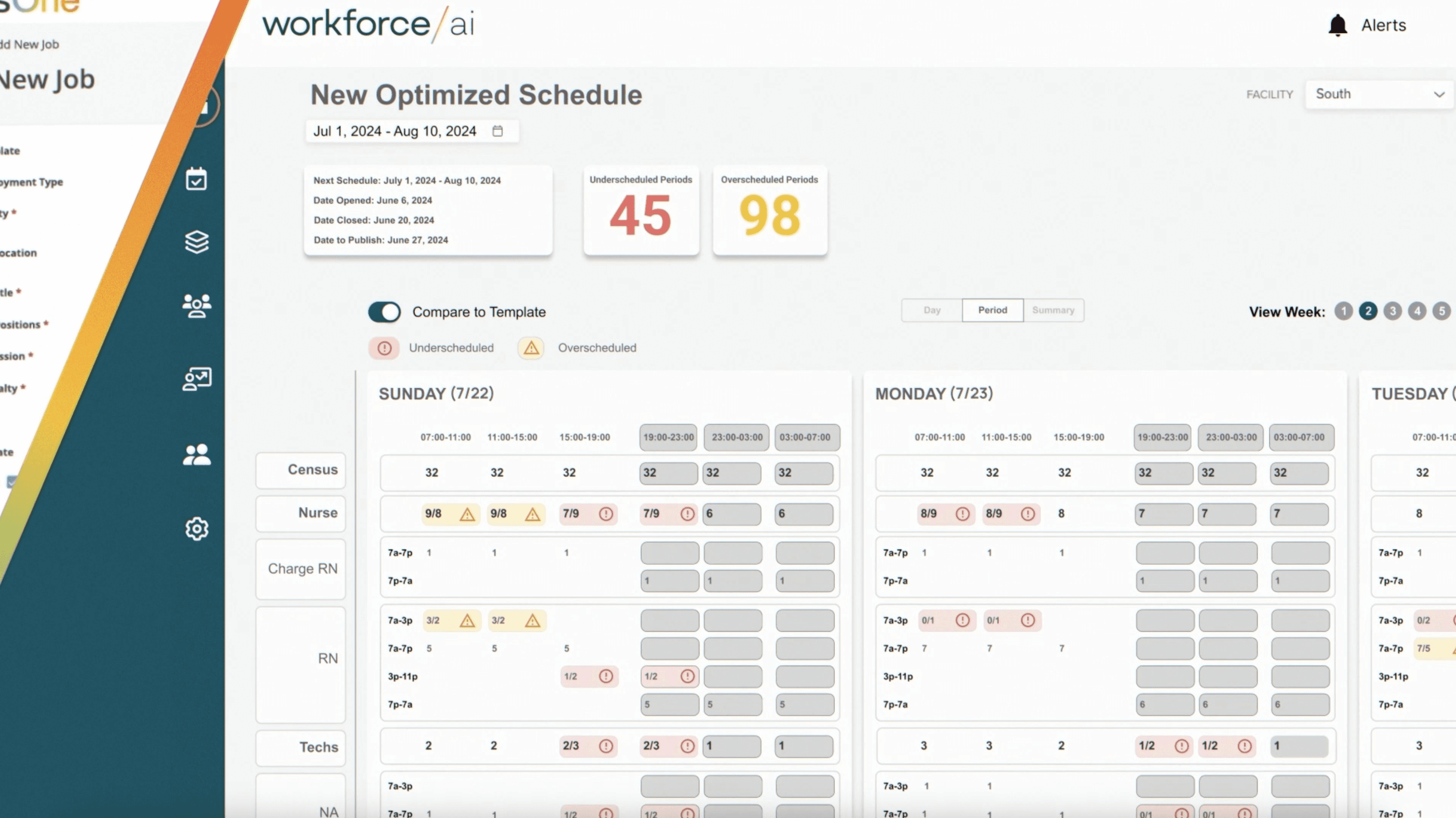
New Optimized Schedule Template

New Optimized

Schedule Template

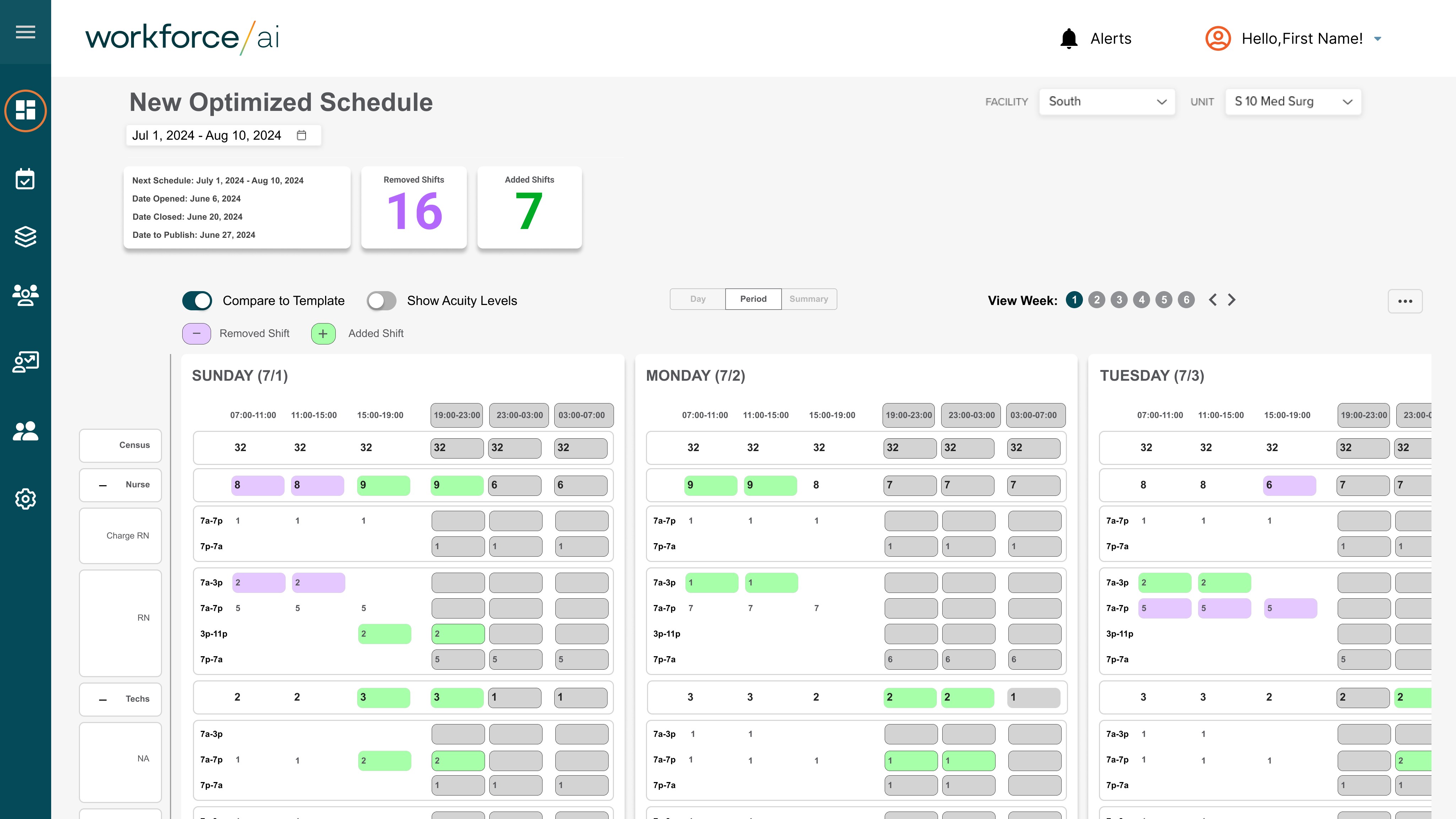
AI-generated schedules as a starting point, not a final answer
Positioned optimization as a baseline that users could review, adjust, and approve.


Frame the three modules as a progression, not features:

  1. Schedule Template → Define intent and constraints

  2. New Optimized Schedule → Generate an AI-assisted baseline

  3. Auto-Balance → Maintain coverage as conditions change


AI-generated schedules as a starting point, not a final answer
Positioned optimization as a baseline that users could review, adjust, and approve.


Frame the three modules as a progression, not features:

  1. Schedule Template → Define intent and constraints

  2. New Optimized Schedule → Generate an AI-assisted baseline

  3. Auto-Balance → Maintain coverage as conditions change


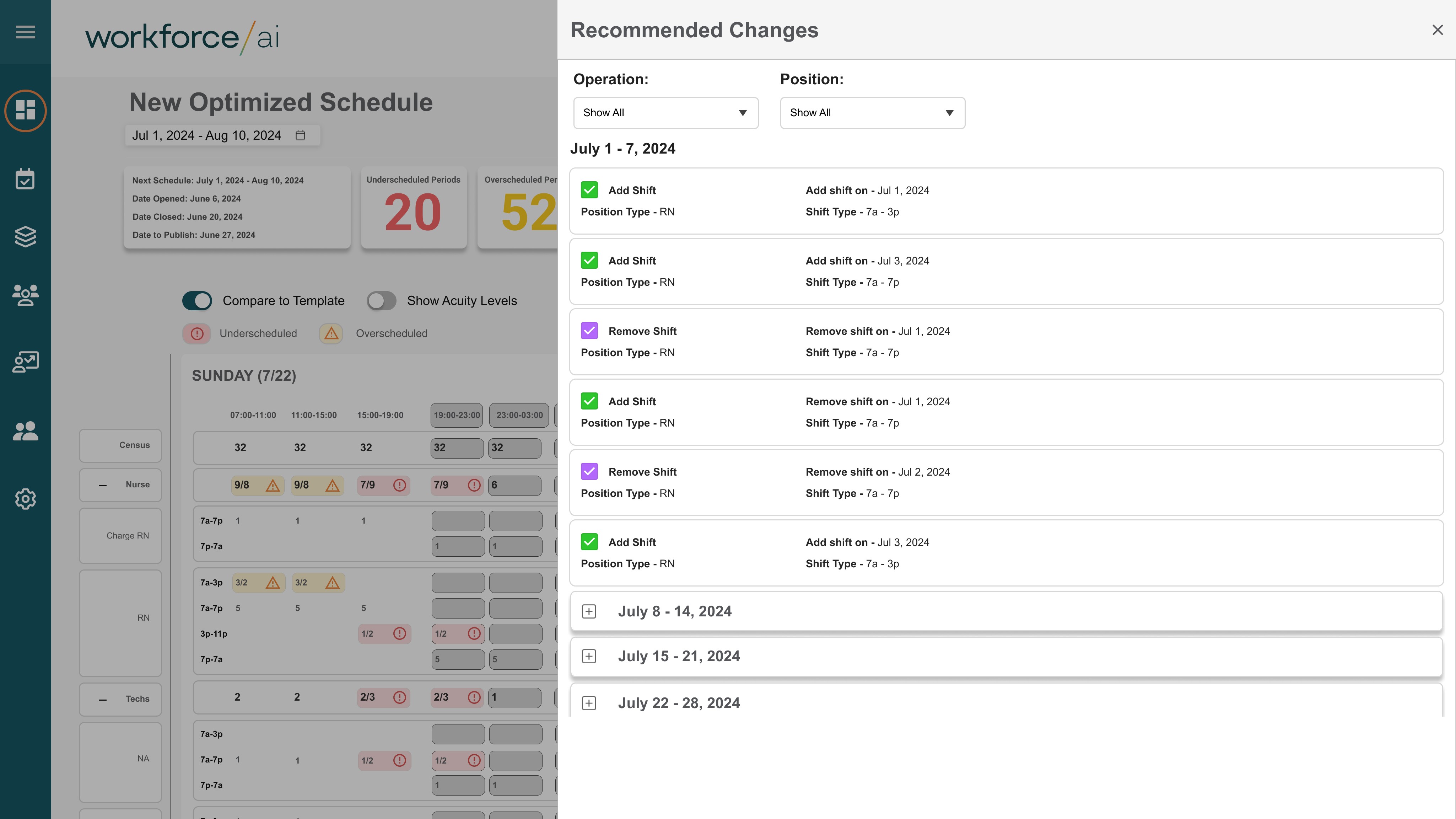
Optimization Explanation / Metrics

Optimization Explanation

/ Metrics

Why the schedule was optimized this way

Frame the three modules as a progression, not features:

  1. Schedule Template → Define intent and constraints

  2. New Optimized Schedule → Generate an AI-assisted baseline

  3. Auto-Balance → Maintain coverage as conditions change


Why the schedule was optimized this way

Frame the three modules as a progression, not features:

  1. Schedule Template → Define intent and constraints

  2. New Optimized Schedule → Generate an AI-assisted baseline

  3. Auto-Balance → Maintain coverage as conditions change


Optimized Schedule

Completed Optimized Schedule

Completed Optimized

Schedule

Built trust through transparent optimization logic
Explained tradeoffs and improvements to help users evaluate AI recommendations.


Frame the three modules as a progression, not features:

  1. Schedule Template → Define intent and constraints

  2. New Optimized Schedule → Generate an AI-assisted baseline

  3. Auto-Balance → Maintain coverage as conditions change


Built trust through transparent optimization logic
Explained tradeoffs and improvements to help users evaluate AI recommendations.


Frame the three modules as a progression, not features:

  1. Schedule Template → Define intent and constraints

  2. New Optimized Schedule → Generate an AI-assisted baseline

  3. Auto-Balance → Maintain coverage as conditions change


Auto-Balance Dashboard

Auto-Balance Dashboard

EDIT
EDIT

Frame the three modules as a progression, not features:

  1. Schedule Template → Define intent and constraints

  2. New Optimized Schedule → Generate an AI-assisted baseline

  3. Auto-Balance → Maintain coverage as conditions change


EDIT
EDIT

Frame the three modules as a progression, not features:

  1. Schedule Template → Define intent and constraints

  2. New Optimized Schedule → Generate an AI-assisted baseline

  3. Auto-Balance → Maintain coverage as conditions change


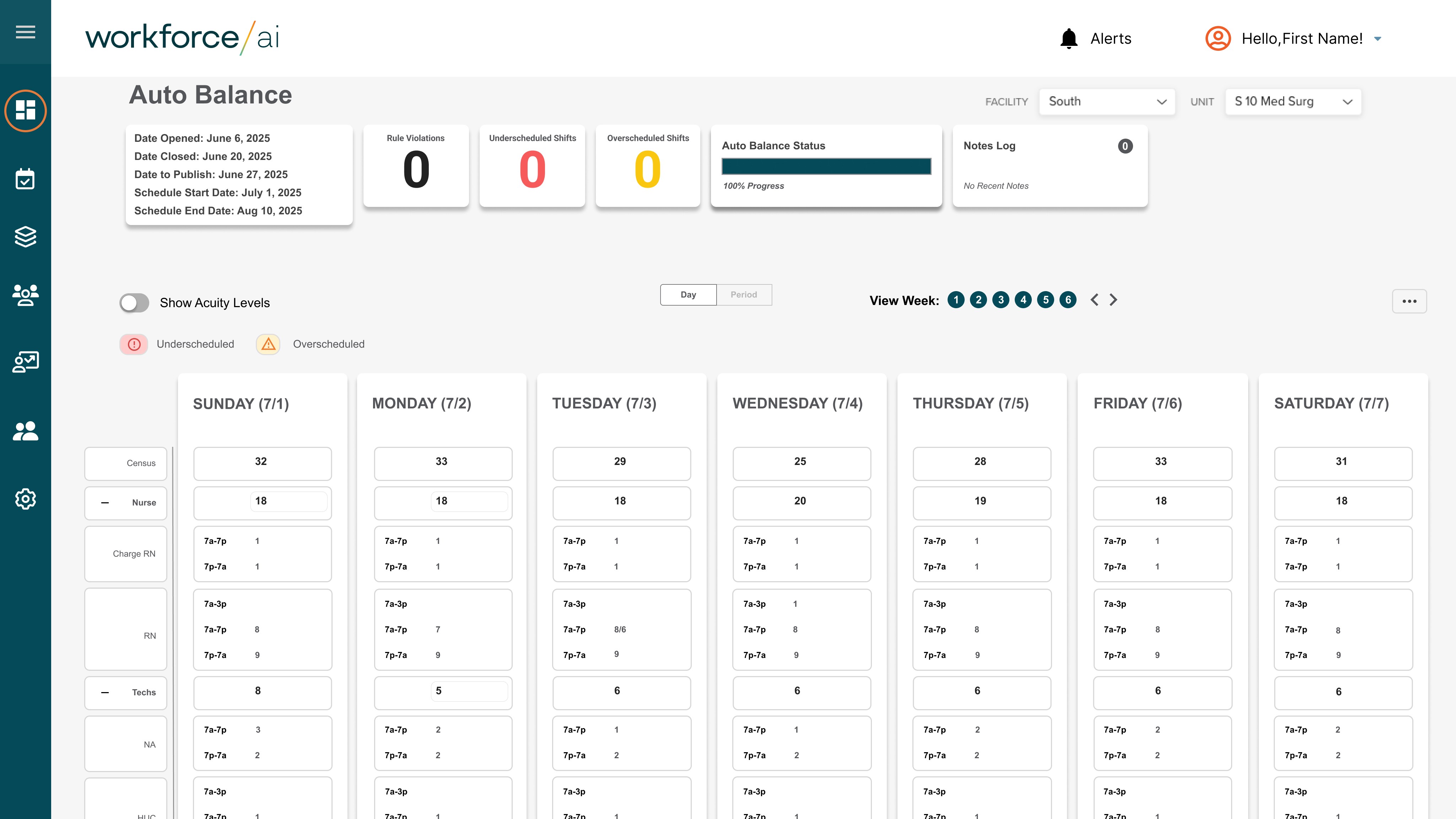
Auto-Balance in Action

Auto-Balance in Action

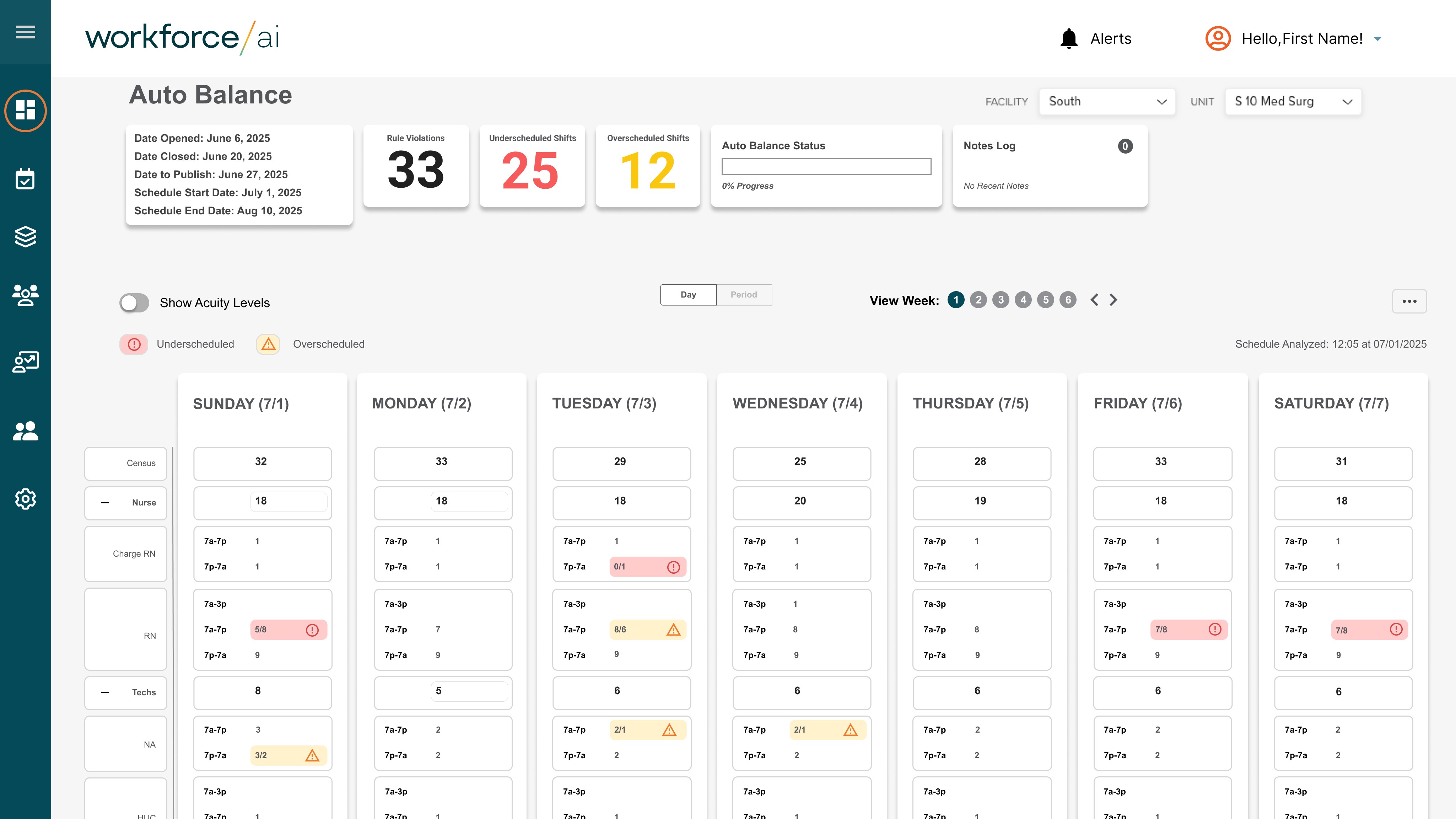
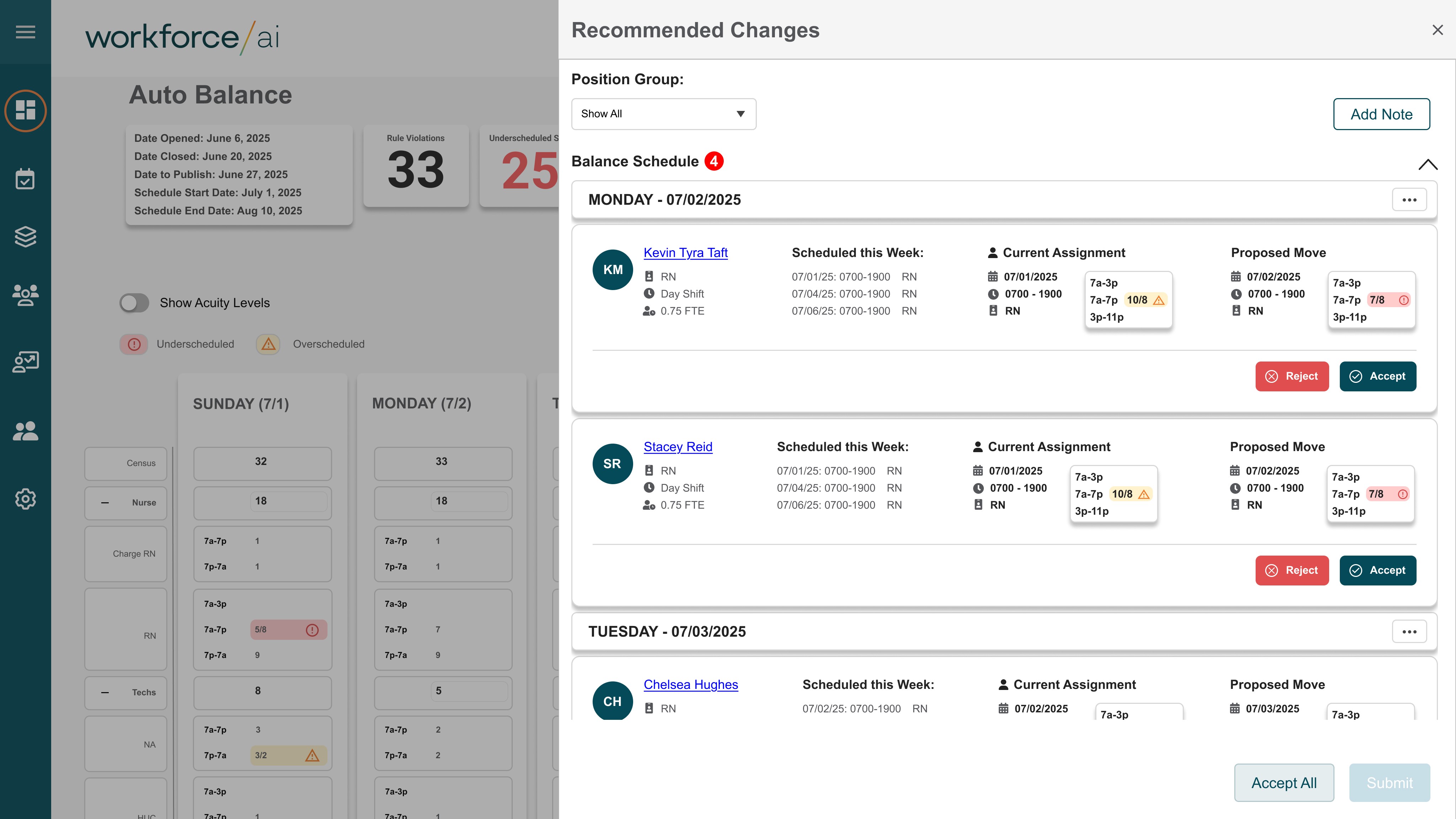
Maintaining coverage as conditions change
Designed Auto-Balance to respond to real-time disruptions while minimizing unnecessary schedule churn.


Frame the three modules as a progression, not features:

  1. Schedule Template → Define intent and constraints

  2. New Optimized Schedule → Generate an AI-assisted baseline

  3. Auto-Balance → Maintain coverage as conditions change


Maintaining coverage as conditions change
Designed Auto-Balance to respond to real-time disruptions while minimizing unnecessary schedule churn.


Frame the three modules as a progression, not features:

  1. Schedule Template → Define intent and constraints

  2. New Optimized Schedule → Generate an AI-assisted baseline

  3. Auto-Balance → Maintain coverage as conditions change


Auto-Balance Control & Overrides

Auto-Balance

Control & Overrides

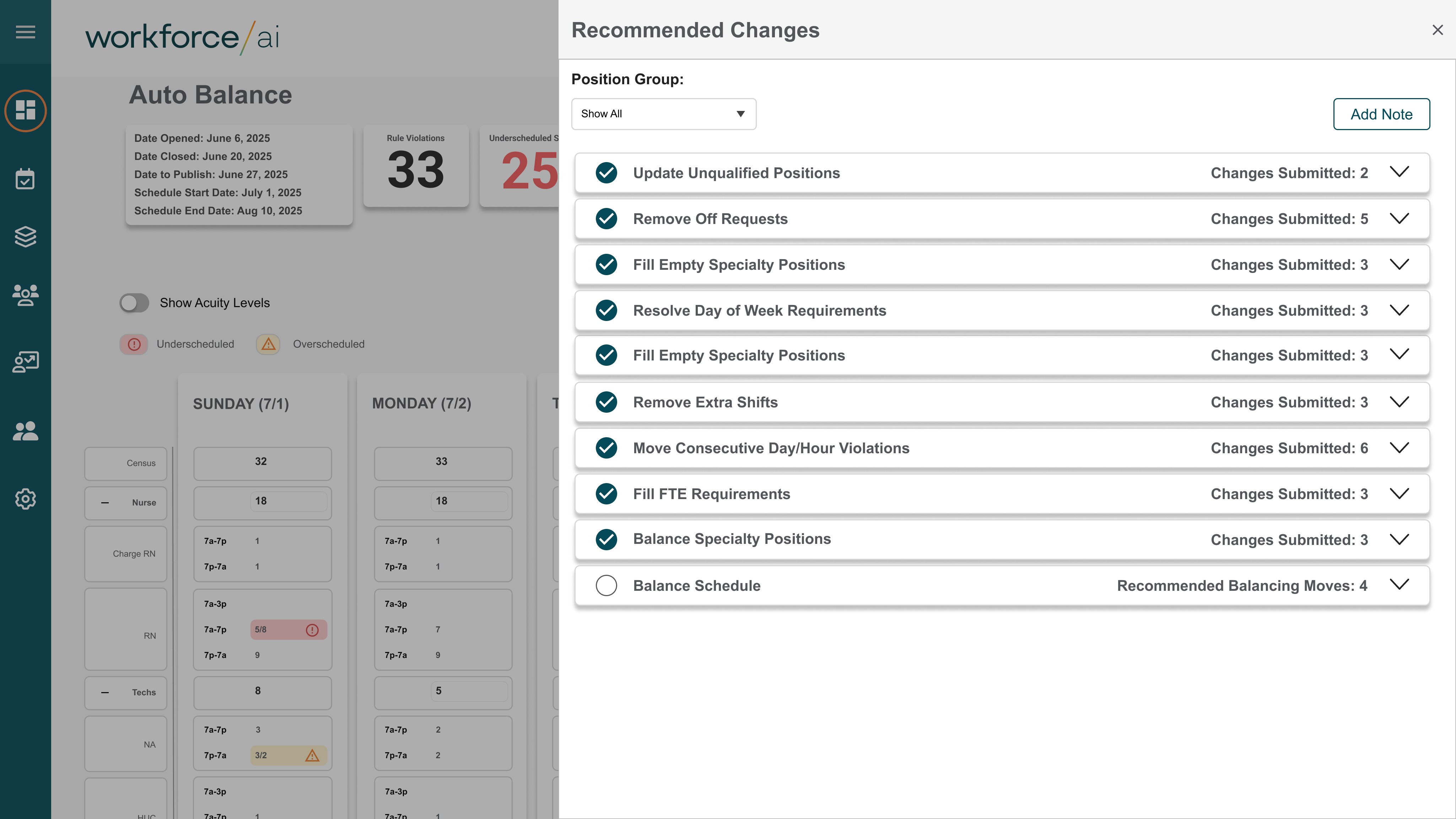
Preserving human control in automated workflows
Gave users explicit control and visibility to maintain trust and accountability.


Frame the three modules as a progression, not features:

  1. Schedule Template → Define intent and constraints

  2. New Optimized Schedule → Generate an AI-assisted baseline

  3. Auto-Balance → Maintain coverage as conditions change


Preserving human control in automated workflows
Gave users explicit control and visibility to maintain trust and accountability.


Frame the three modules as a progression, not features:

  1. Schedule Template → Define intent and constraints

  2. New Optimized Schedule → Generate an AI-assisted baseline

  3. Auto-Balance → Maintain coverage as conditions change


Completed Auto-Balanced Schedule

Completed Auto-Balanced

Schedule

EDIT
EDIT


Frame the three modules as a progression, not features:

  1. Schedule Template → Define intent and constraints

  2. New Optimized Schedule → Generate an AI-assisted baseline

  3. Auto-Balance → Maintain coverage as conditions change


EDIT
EDIT


Frame the three modules as a progression, not features:

  1. Schedule Template → Define intent and constraints

  2. New Optimized Schedule → Generate an AI-assisted baseline

  3. Auto-Balance → Maintain coverage as conditions change


Solution

Solution

Solution

The final Predictive Scheduling experience included:

  • Proactive scheduling recommendations with confidence scores

  • Visual alerts for conflicts, gaps, and coverage risks

  • Scenario simulation for planning adjustments

  • Integrated workflows for operational and executive users

The final Predictive Scheduling experience included:

  • Proactive scheduling recommendations with confidence scores

  • Visual alerts for conflicts, gaps, and coverage risks

  • Scenario simulation for planning adjustments

  • Integrated workflows for operational and executive users

Product Experience Overview

Product Experience

Overview

Together, these modules enable teams to define scheduling intent, generate optimized schedules, and maintain coverage over time — transforming scheduling from a static artifact into a living, adaptive system.

Together, these modules enable teams to define scheduling intent, generate optimized schedules, and maintain coverage over time — transforming scheduling from a static artifact into a living, adaptive system.

Outcome & Impact

Outcome & Impact

Outcome & Impact

  • Operational teams reduced last-minute scheduling conflicts

  • Improved staff satisfaction and reduced burnout

  • Enabled proactive management of staffing resources

  • Contributed to enterprise adoption and demonstrated Aya’s AI value to clients

Reflection

Reflection

Reflection

Key takeaways:

  • Predictive tools must balance AI insight with human oversight

  • Visualization and hierarchy are critical in dense scheduling data

  • Scenario-based design encourages proactive behavior and increases adoption


If revisiting:

  • Explore personalized recommendations per department

  • Enhance predictive alerts with historical context

  • Expand executive reporting options for cross-team visibility

Let's work

together.

Let's work

together.