01
01
01
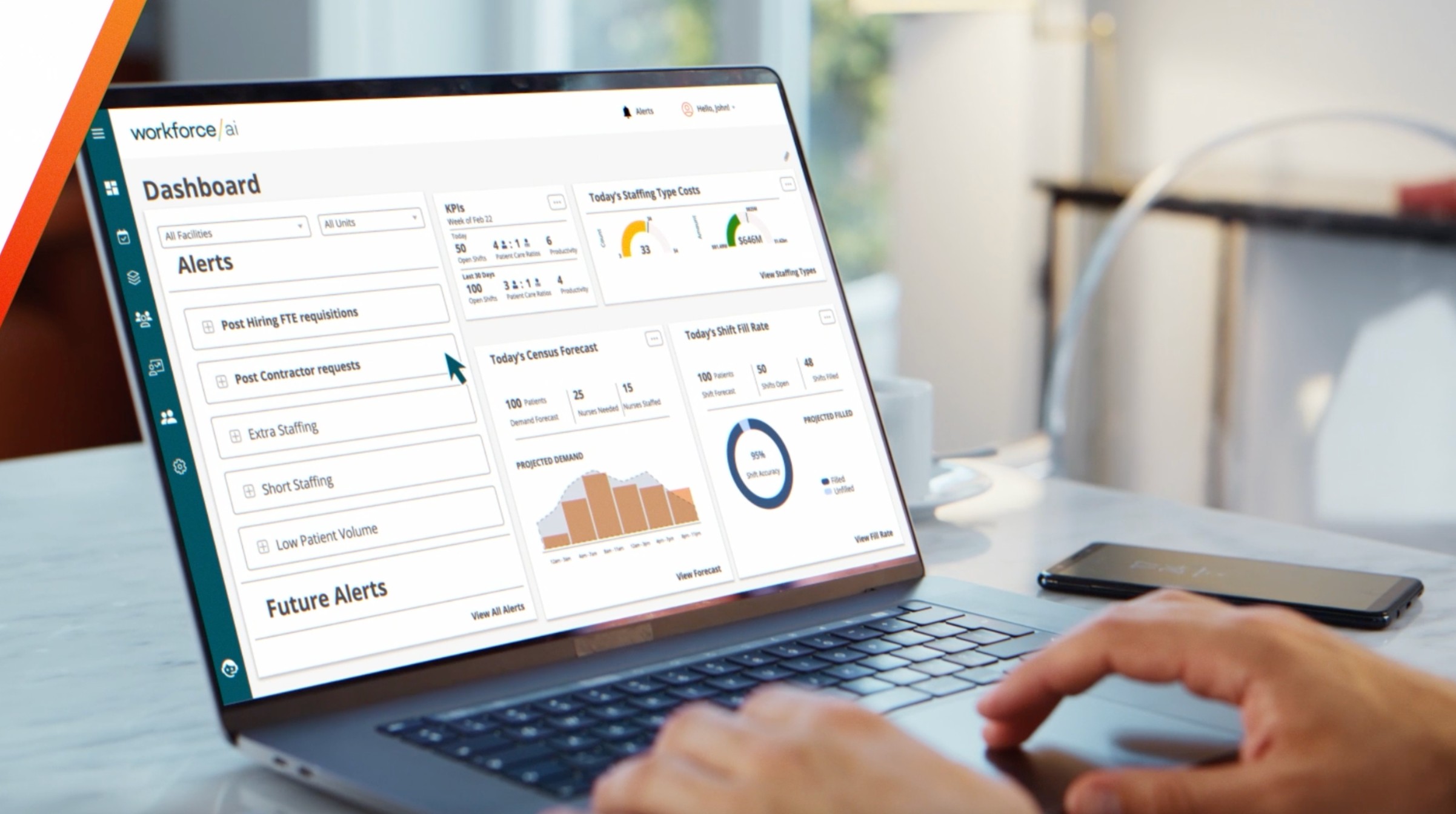
Workforce Planning
Workforce Planning
Workforce Planning
The Workforce Planning Module analyzes market trends and uses workforce data to forecast hiring needs up to 12 months in advance plus push jobs to your VMS to fill open role quickly.
The Workforce Planning Module analyzes market trends and uses workforce data to forecast hiring needs up to 12 months in advance plus push jobs to your VMS to fill open role quickly.
The Workforce Planning Module analyzes market trends and uses workforce data to forecast hiring needs up to 12 months in advance plus push jobs to your VMS to fill open role quickly.
Company
Product
Role
Duration
Platform
Company
Product
Role
Duration
Platform
Aya Healthcare
Workforce Planning
Senior Product Designer (IC)
2024 - Present
Enterprise Web (B2B Saas)
Aya Healthcare
Workforce Planning
Senior Product Designer (IC)
2024 - Present
Enterprise Web (B2B Saas)
Impact
Impact
Impact
Supported $35.5M in enterprise contracts across 7 clients
Enabled operational and executive teams to plan staffing needs using predictive insights
Reduced ambiguity in long-range workforce decisions through data-driven planning tools
Problem
Healthcare organizations face chronic staffing shortages, fluctuating demand, and limited visibility into future workforce needs.
Existing planning tools:
Relied heavily on static spreadsheets and manual forecasts
Offered limited trust or transparency into predictive models
Were difficult for non-technical users to interpret and act on
The challenge:
Design an AI-powered workforce planning experience that decision-makers could trust, understand, and act on — without overwhelming them with data complexity.
Problem
My Role & Scope
Problem
Healthcare organizations face chronic staffing shortages, fluctuating demand, and limited visibility into future workforce needs.
Existing planning tools:
Relied heavily on static spreadsheets and manual forecasts
Offered limited trust or transparency into predictive models
Were difficult for non-technical users to interpret and act on
The challenge:
Design an AI-powered workforce planning experience that decision-makers could trust, understand, and act on — without overwhelming them with data complexity.
I led end-to-end product design for Workforce Planning, partnering closely with:
Product Management
Engineering
Sales and Executive Stakeholders
My responsibilities included:
Defining product experience strategy from early discovery through launch
Translating predictive models into usable, trustworthy interfaces
Driving alignment across cross-functional teams in highly ambiguous problem spaces
Rapid prototyping to support executive and enterprise sales conversations
My Role & Scope
Users & Context
My Role & Scope
I led end-to-end product design for Workforce Planning, partnering closely with:
Product Management
Engineering
Sales and Executive Stakeholders
My responsibilities included:
Defining product experience strategy from early discovery through launch
Translating predictive models into usable, trustworthy interfaces
Driving alignment across cross-functional teams in highly ambiguous problem spaces
Rapid prototyping to support executive and enterprise sales conversations
Primary users:
Workforce planners
Operational leaders
Executive stakeholders
These users needed to:
Understand future staffing demand at a glance
Evaluate multiple planning scenarios
Confidently explain decisions to leadership teams
Key constraint:
Decisions informed by this tool directly impacted patient care and labor costs — accuracy and clarity were critical.
Key Constraints &
Design Challenges
AI trust: Users were skeptical of black-box predictions
Data density: Planning required synthesizing large volumes of historical and predictive data
User diversity: Needs ranged from operational planners to C-suite executives
Enterprise scale: Designs had to work across multiple organizations with varying workflows
These constraints shaped every design decision.
Users & Context
Design Approach
Users & Context
Primary users:
Workforce planners
Operational leaders
Executive stakeholders
These users needed to:
Understand future staffing demand at a glance
Evaluate multiple planning scenarios
Confidently explain decisions to leadership teams
Key constraint:
Decisions informed by this tool directly impacted patient care and labor costs — accuracy and clarity were critical.
Rather than exposing raw model outputs, I focused on:
Progressive disclosure of data complexity
Clear mental models for understanding forecasts
Scenario-based planning instead of single-point predictions
I worked closely with Data Science to understand model behavior and partnered with Product to align on what decisions the product needed to support — not just what data was available.
Key Constraints & Design
Challenges
Key Design Decisions
Key Constraints & Design
Challenges
AI trust: Users were skeptical of black-box predictions
Data density: Planning required synthesizing large volumes of historical and predictive data
User diversity: Needs ranged from operational planners to C-suite executives
Enterprise scale: Designs had to work across multiple organizations with varying workflows
These constraints shaped every design decision.
Make predictions interpretable, not opaque
Instead of showing raw forecasts, I designed visualizations that emphasized:
Trends over time
Confidence ranges
Clear deltas between scenarios
This helped users reason about why a recommendation existed, not just what it was.
Design Approach
Design Approach
Rather than exposing raw model outputs, I focused on:
Progressive disclosure of data complexity
Clear mental models for understanding forecasts
Scenario-based planning instead of single-point predictions
Workforce Planning supports long-range staffing decisions by connecting staffing targets, hiring plans, and productivity assumptions into a single planning system.
Key Design Decisions
Key Design Decisions
1. Make predictions interpretable, not opaque
Instead of showing raw forecasts, I designed visualizations that emphasized:
Trends over time
Confidence ranges
Clear deltas between scenarios
This helped users reason about why a recommendation existed, not just what it was.
High-level Workforce Dashboard
High-level Workforce
Planning Dashboard
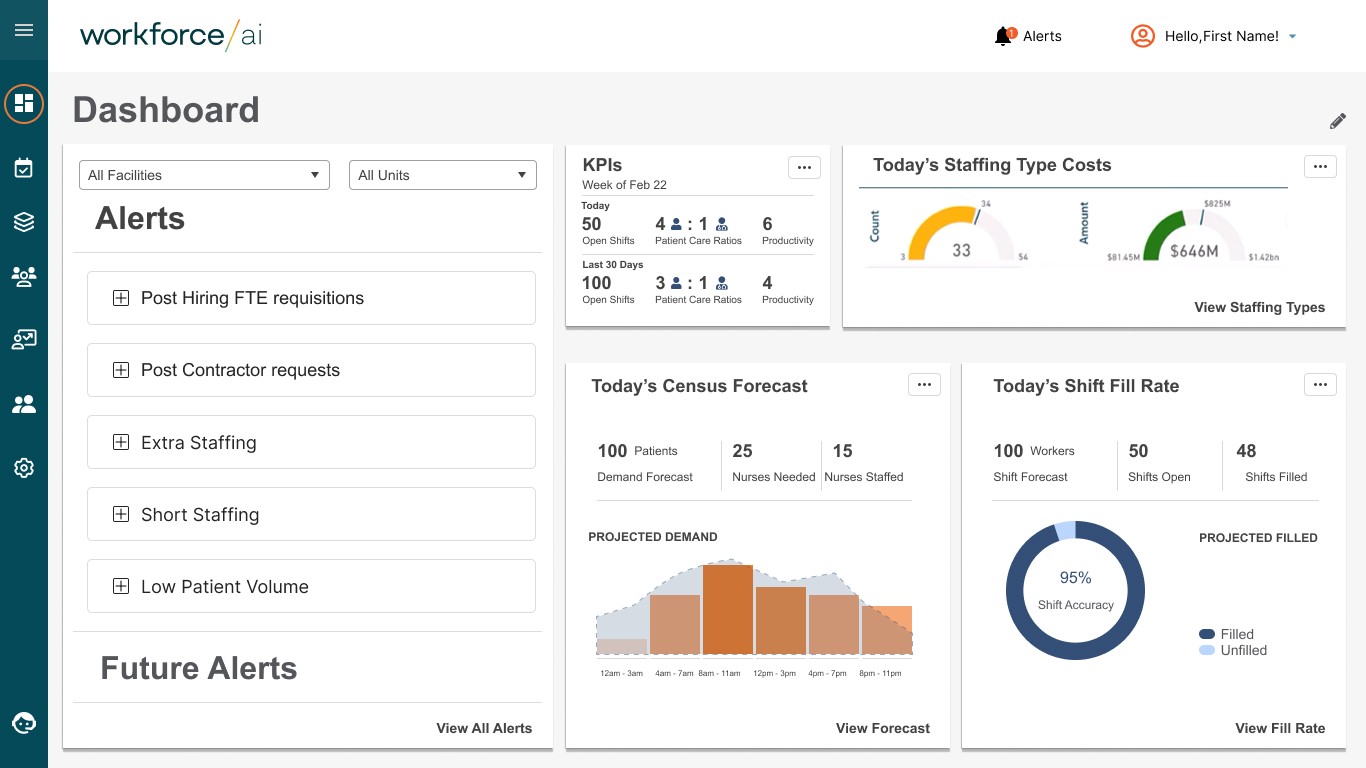
A connected planning system for long-range workforce decisions
Designed Workforce Planning as a set of interdependent views, each supporting a distinct planning decision.
Designed to summarize future staffing risk at a glance for operational and executive users.
Balances forecast accuracy with interpretability to support high-stakes decisions.
Workforce Planning System Overview
Workforce Planning
System Overview
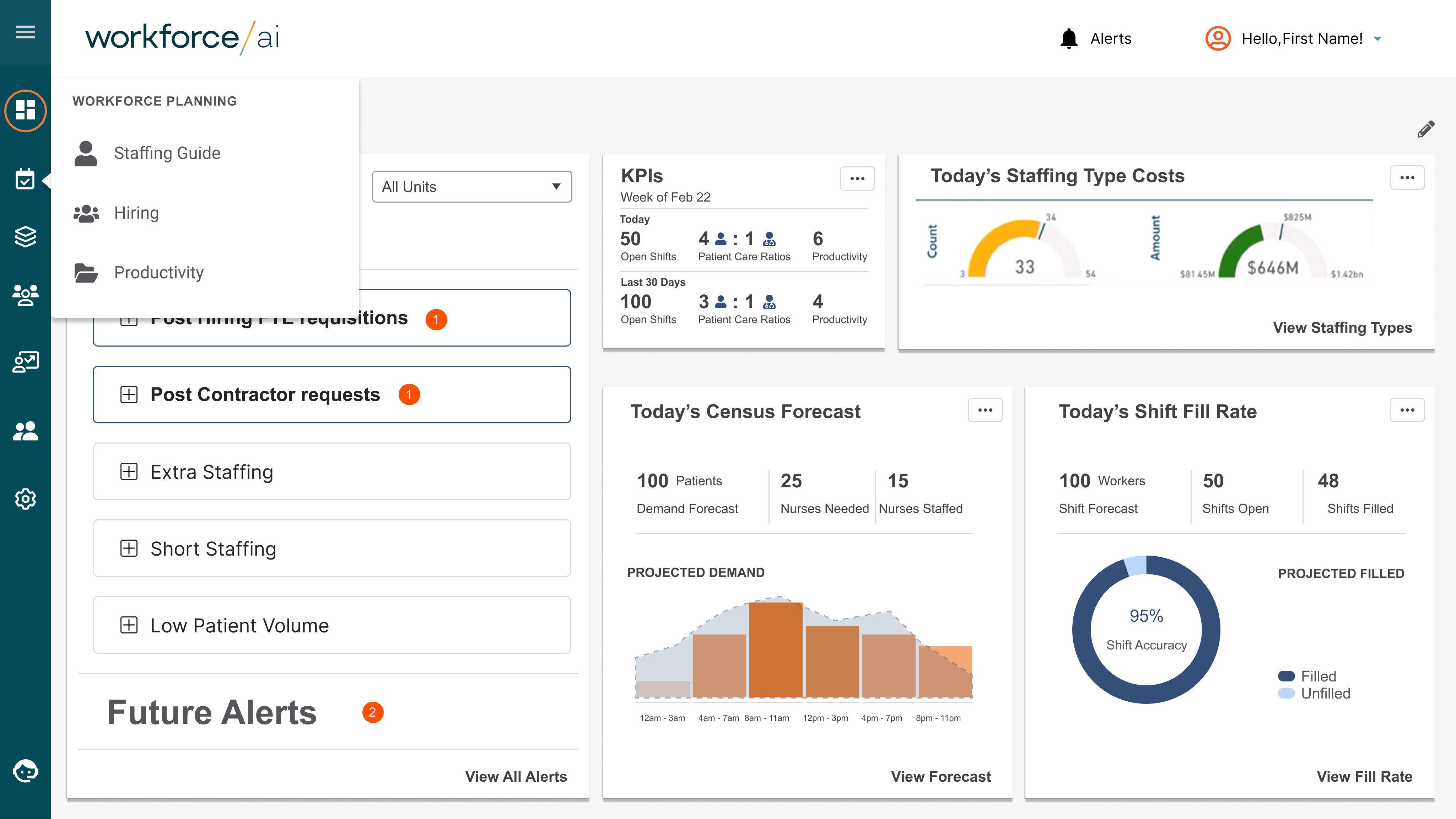
The product is organized around three planning decisions:
Define staffing targets → plan hiring → validate productivity assumptions.
Staffing Guide - Defining the plan
Staffing Guide -
Defining the plan
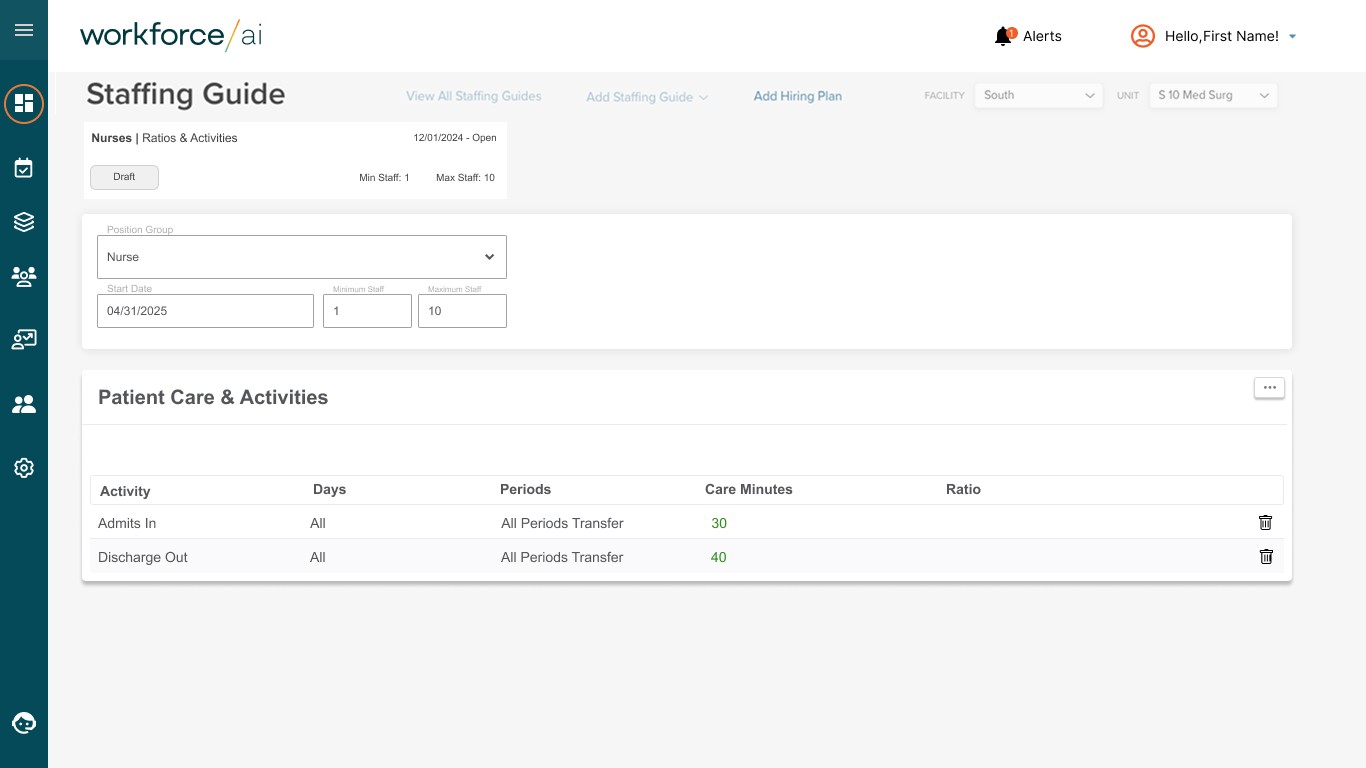
Defining staffing targets aligned to future demand
Designed the Staffing Guide to help leaders set clear staffing goals before making downstream hiring or productivity decisions.
Defining staffing targets aligned to future demand
Designed the Staffing Guide to help leaders set clear staffing goals before making downstream hiring or productivity decisions.
Staffing Guide - Guide Detail / Scenario View
Staffing Guide -
Guide Detail / Scenario View
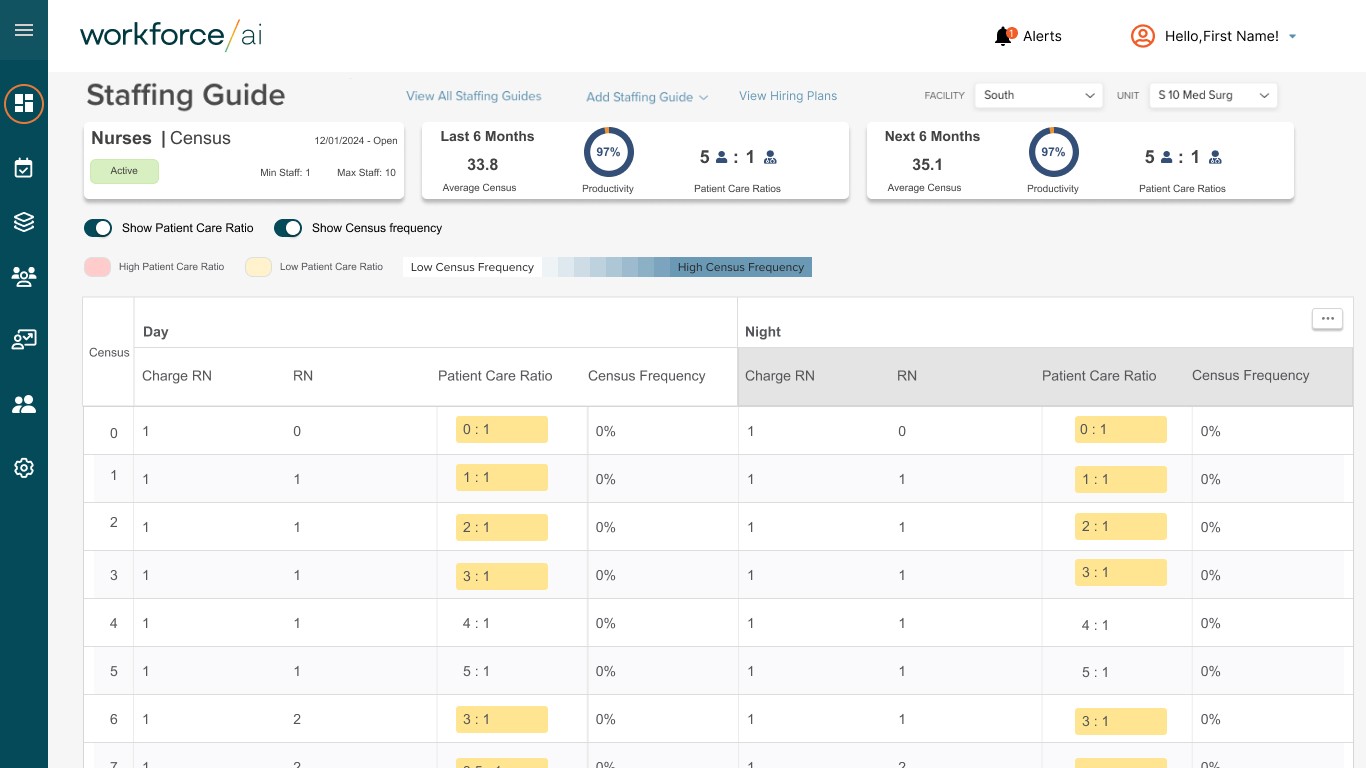
Scenario-based planning instead of static targets
Enabled teams to explore tradeoffs and understand the impact of staffing decisions under different assumptions.
Scenario-based planning instead of static targets
Enabled teams to explore tradeoffs and understand the impact of staffing decisions under different assumptions.
Hiring — Model Creation
Hiring — Model Creation
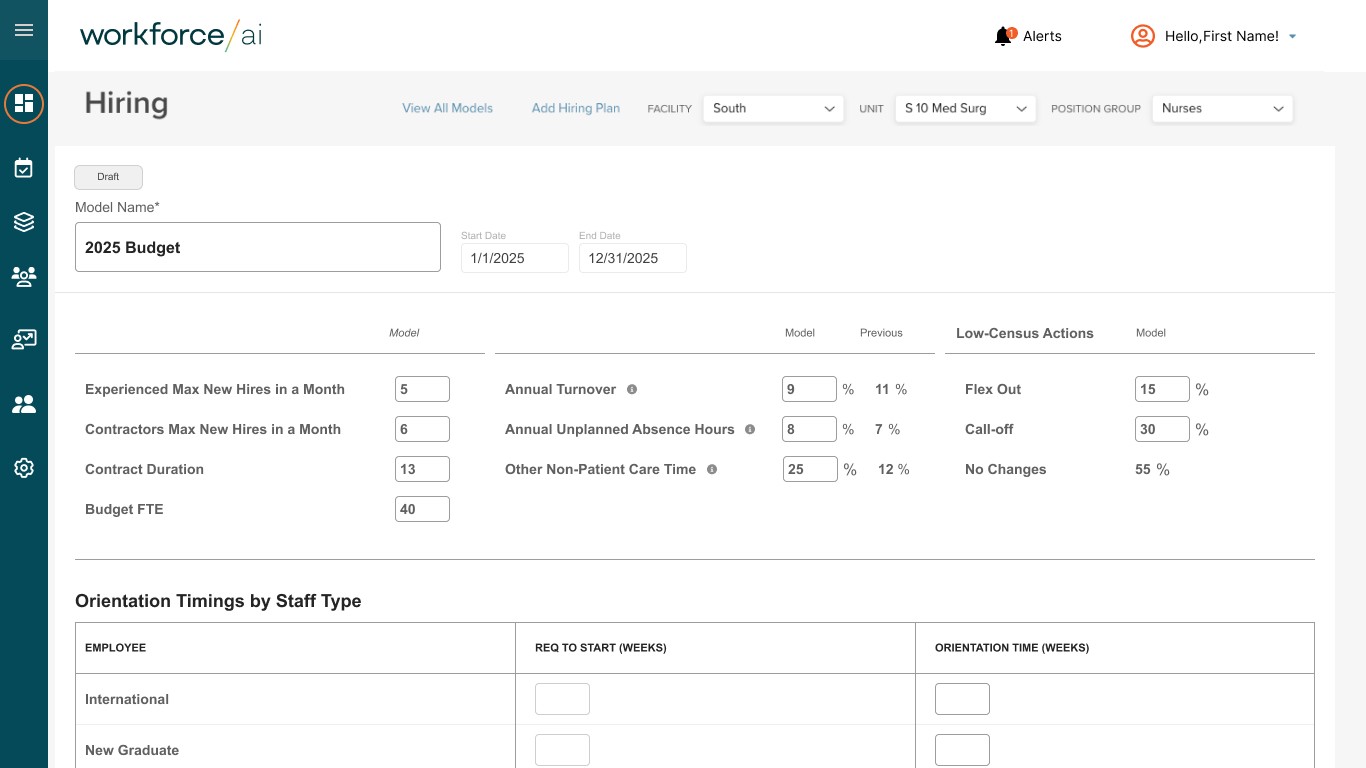
Model Hiring variables and tradeoffs
Made hiring Models variable so leaders could adjust expectations before gaps became operational risks.
Hiring — Translating targets into action
Hiring — Translating
targets into action
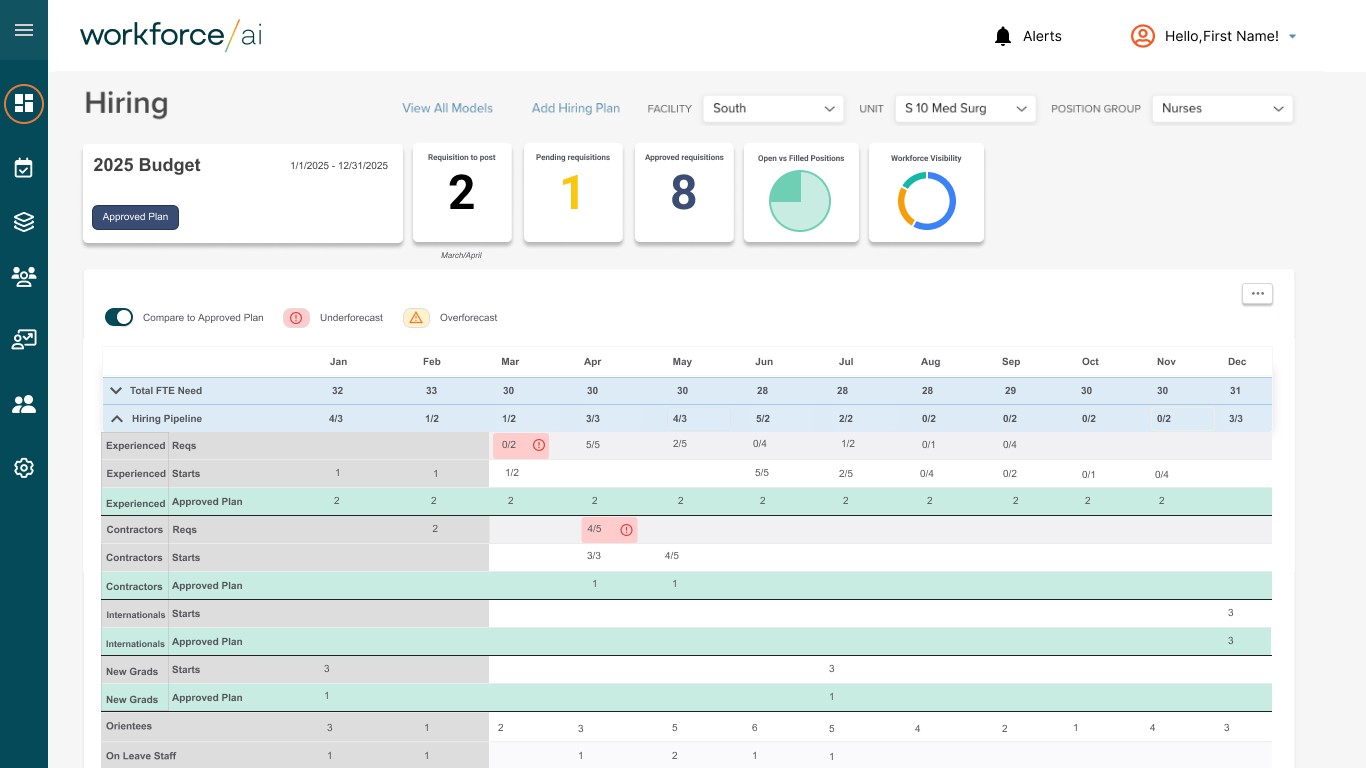
Turning staffing targets into actionable hiring plans
Connected long-range staffing goals to concrete hiring timelines and capacity planning.
2. Design for decision-making, not analysis
Workforce Planning was structured around questions users were already asking, such as:
“What happens if demand increases by 10%?”
“Where are we most at risk in the next quarter?”
The UI prioritized:
Comparison between scenarios
Clear callouts for risk and opportunity
Actionable summaries for executive communication
2. Design for decision-making, not analysis
Workforce Planning was structured around questions users were already asking, such as:
“What happens if demand increases by 10%?”
“Where are we most at risk in the next quarter?”
The UI prioritized:
Comparison between scenarios
Clear callouts for risk and opportunity
Actionable summaries for executive communication
3. Balance accuracy, usability, and trust
In collaboration with Product Management and Engineering, I made intentional tradeoffs:
Avoided over-precision that could imply false certainty
Used language and visuals that reinforced probabilistic thinking
Ensured explanations were available without overwhelming primary workflows
This balance was critical to adoption.
Balance accuracy, usability, and trust
In collaboration with Product Management and Engineering, I made intentional tradeoffs:
Avoided over-precision that could imply false certainty
Used language and visuals that reinforced probabilistic thinking
Ensured explanations were available without overwhelming primary workflows
This balance was critical to adoption.
Productivity — Scenario Summary
Productivity —
Scenario Summary
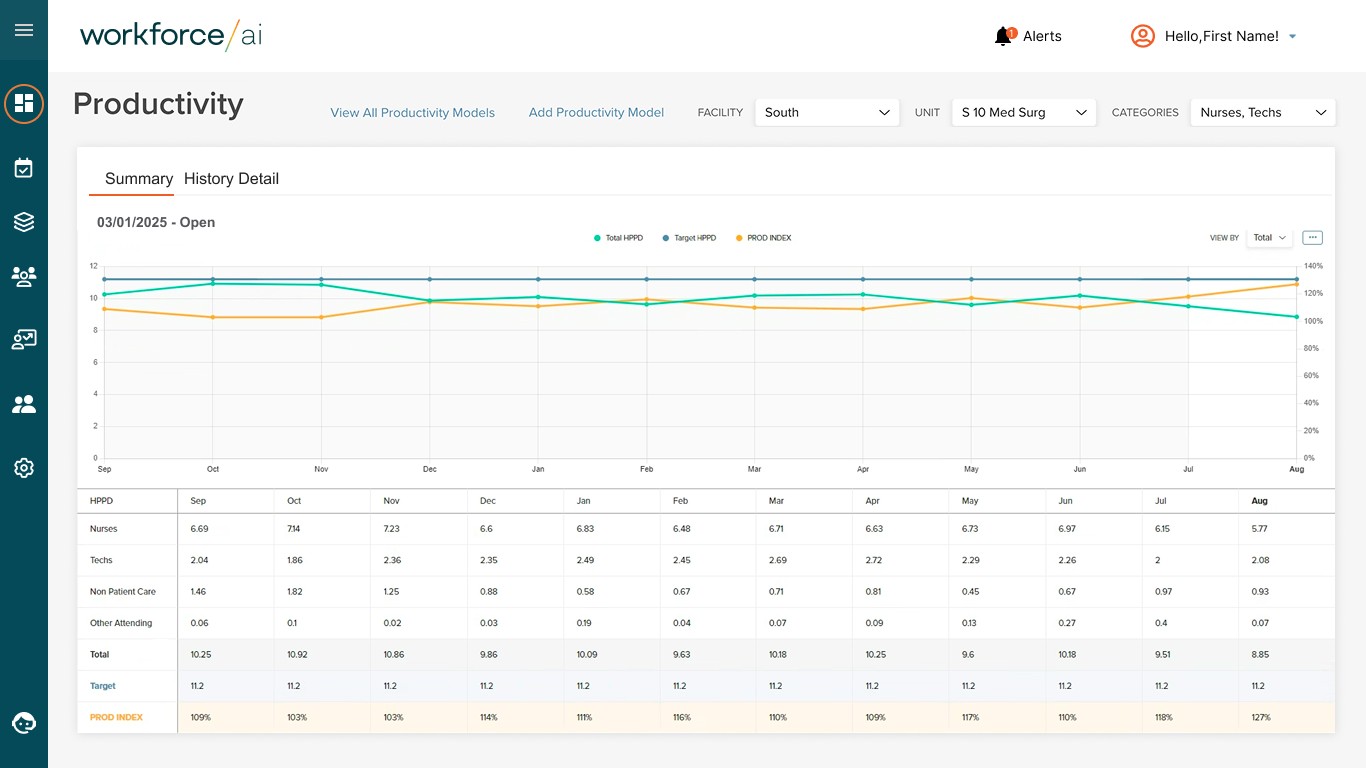
Making productivity assumptions explicit
Designed this view to help teams understand how productivity directly influences staffing requirements.
Productivity — History Details
Productivity —
History Details
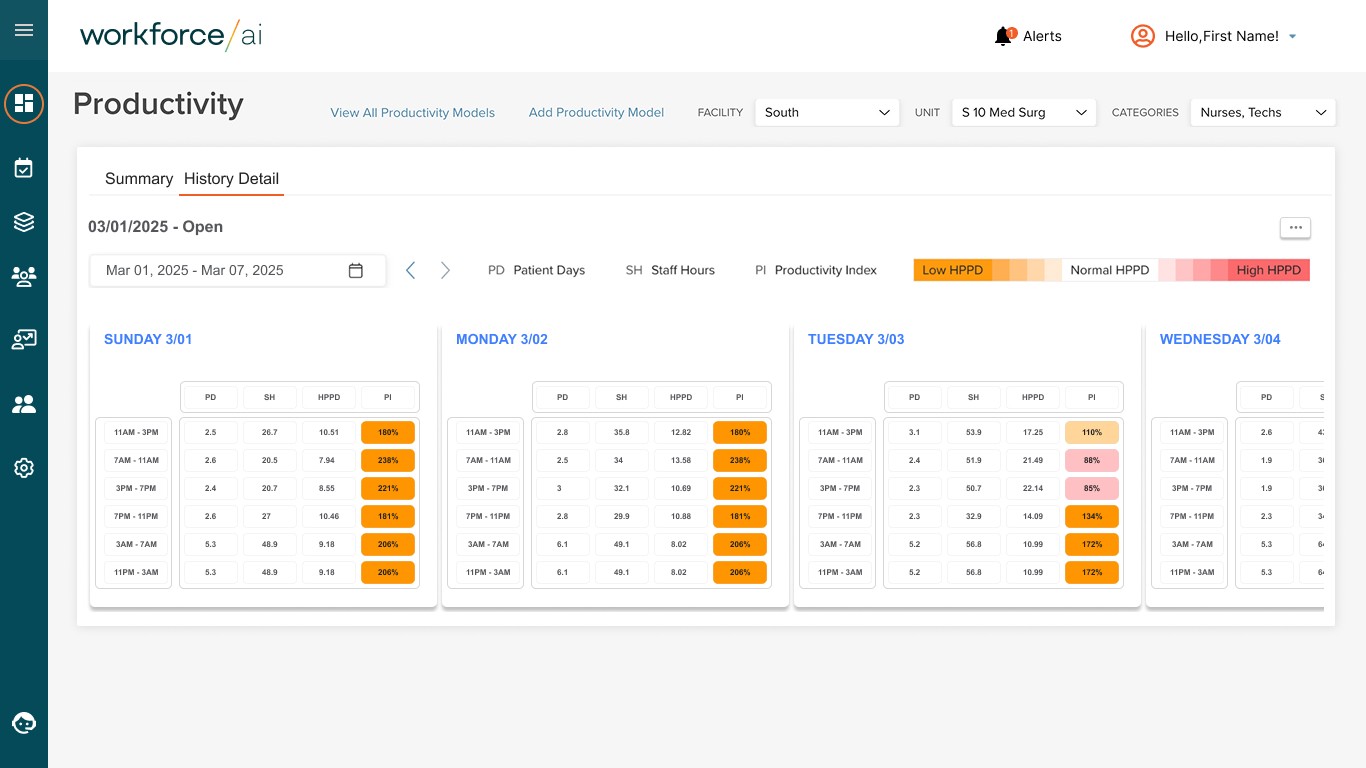
Connecting productivity to downstream planning decisions
Allowed leaders to test productivity scenarios and immediately see their impact on hiring and staffing plans.
Solution
The final Workforce Planning experience included:
Forecast-driven dashboards for future staffing demand
Scenario planning tools to explore multiple outcomes
Clear summaries designed for executive readouts
Flexible views to support both operational and strategic users
The system translated complex predictive models into clear, actionable planning decisions.
Solution
The final Workforce Planning experience included:
Forecast-driven dashboards for future staffing demand
Scenario planning tools to explore multiple outcomes
Clear summaries designed for executive readouts
Flexible views to support both operational and strategic users
The system translated complex predictive models into clear, actionable planning decisions.
Solution
The final Workforce Planning experience included:
Forecast-driven dashboards for future staffing demand
Scenario planning tools to explore multiple outcomes
Clear summaries designed for executive readouts
Flexible views to support both operational and strategic users
The system translated complex predictive models into clear, actionable planning decisions.
Outcome & Impact
Workforce Planning became a core component of Aya’s enterprise AI offerings
Design contributions supported $35.5M in enterprise contracts across 7 clients
Sales teams used the product in executive demos and RFPs
Stakeholders reported increased confidence in long-term planning decision
Outcome & Impact
Workforce Planning became a core component of Aya’s enterprise AI offerings
Design contributions supported $35.5M in enterprise contracts across 7 clients
Sales teams used the product in executive demos and RFPs
Stakeholders reported increased confidence in long-term planning decision
Outcome & Impact
Workforce Planning became a core component of Aya’s enterprise AI offerings
Design contributions supported $35.5M in enterprise contracts across 7 clients
Sales teams used the product in executive demos and RFPs
Stakeholders reported increased confidence in long-term planning decision
Reflection
Designing Workforce Planning reinforced the importance of:
Treating AI as a decision-support tool, not an answer engine
Designing for trust and interpretation as much as accuracy
Partnering deeply with cross-functional teams in ambiguous domains
If revisiting this work, I would explore:
Deeper customization for organization-specific workflows
More explicit onboarding for first-time AI users
Expanded scenario comparisons over longer planning horizons
Reflection
Designing Workforce Planning reinforced the importance of:
Treating AI as a decision-support tool, not an answer engine
Designing for trust and interpretation as much as accuracy
Partnering deeply with cross-functional teams in ambiguous domains
If revisiting this work, I would explore:
Deeper customization for organization-specific workflows
More explicit onboarding for first-time AI users
Expanded scenario comparisons over longer planning horizons
Reflection
Designing Workforce Planning reinforced the importance of:
Treating AI as a decision-support tool, not an answer engine
Designing for trust and interpretation as much as accuracy
Partnering deeply with cross-functional teams in ambiguous domains
If revisiting this work, I would explore:
Deeper customization for organization-specific workflows
More explicit onboarding for first-time AI users
Expanded scenario comparisons over longer planning horizons
Let's work
together.
Let's work
together.